Affiliate Disclosure: This post contains AliExpress affiliate links. If you make a purchase through these links, the author may receive a commission.
Table of Contents
- 1. Reducing Image Generation Time
- 2. Hardware and Model Configuration Used for Comparison
- 3. What Computations Does Spectrum Skip?
- 4. 20 Steps: 11 Computations, 9 Predictions
- 5. Benchmark Results: Total Generation Time Reduced by 41.02%
- 6. What Is the Image Quality of the Accelerated Output?
- 7. Comparing with the Baseline Using Identical Weights
1. Reducing Image Generation Time
When running large-scale Diffusion Transformers (DiT) on-device in a single-board computer (SBC) environment, memory constraints and computation time are the primary bottlenecks. Using a Radxa ROCK 5C 8GB board purchased directly from the official Radxa AliExpress store, we conducted Anima DiT inference optimization experiments based on the 2026-8 environment.
Denoising a 512×512 image for 20 steps took 2,408.54 seconds. Including the time required to reconstruct the image with the VAE, generating a single image exceeded 30 minutes. A method was needed to reduce the computational workload while preserving the visual quality of the output.
We applied Spectrum to the FP16 RKNN configuration executed in Part 1. While retaining the Euler scheduler, we replaced model computations on selected steps with predictions based on prior results, and compared the speed and image quality.
2. Hardware and Model Configuration Used for Comparison
The experimental hardware is the Radxa ROCK 5C single-board computer, equipped with a Rockchip RK3588S2 SoC and 8GB of system memory.
The RKNN runtime target is rk3588. The test device is the ROCK 5C 8GB, which must be distinguished from the ROCK 5C Lite listed on the same product page.
We used 84 FP16 RKNN models, partitioning Anima’s 28 DiT blocks into self-attention, cross-attention, and FFN subgraphs. The underlying conversion structure is identical to the setup described in Part 1.
The NPU processes primary matrix and attention operations. The CPU handles AdaLN, FP32 residual accumulation, the Euler scheduler, text encoding, and VAE decoding. This division of roles was maintained even after adding Spectrum.
3. What Computations Does Spectrum Skip?
Spectrum is not a sampler that replaces Euler. It is a caching technique that predicts the denoised state of the current step from prior computational results to reduce model recalculations. We ported the Spectrum implementation from stable-diffusion.cpp to NumPy and integrated it into the Euler loop.
The core principle of Spectrum leverages the property that latent variable trajectories do not change abruptly between steps during diffusion, forecasting an estimate of the denoised state \(x_0\) from a prior history buffer.
At each step, the pipeline selects between direct computation and prediction. Both paths feed their results into the same Euler scheduler.
- On directly computed steps, conditional and unconditional outputs are combined via CFG, and the denoised state is calculated as x₀ = xₜ − σ × prediction and stored in the history buffer.
- On prediction steps, the current x₀ is estimated from prior history, skipping NPU model computation entirely.
- The estimated x₀ is converted back into a flow prediction via prediction = (xₜ − x₀) / σ. Both paths update the next state using the same Euler integrator.
Thanks to this architecture, the scheduler itself retains the FlowMatch Euler formulation while substantially reducing the number of tensor operations dispatched to the NPU.
4. 20 Steps: 11 Computations, 9 Predictions
Across a 20-step run, the steps computed directly and those replaced with predictions are broken down as follows:
- Actual model computation steps (11 steps): Step 1, 2, 3, 4, 6, 8, 11, 14, 18, 19, 20
- State prediction skipped steps (9 steps): Step 5, 7, 9, 10, 12, 13, 15, 16, 17
The first 4 steps were all directly computed to accumulate the history required for forecasting. In the intermediate phase, 9 steps were replaced with predictions, and the final 18~20 step was directly computed again.
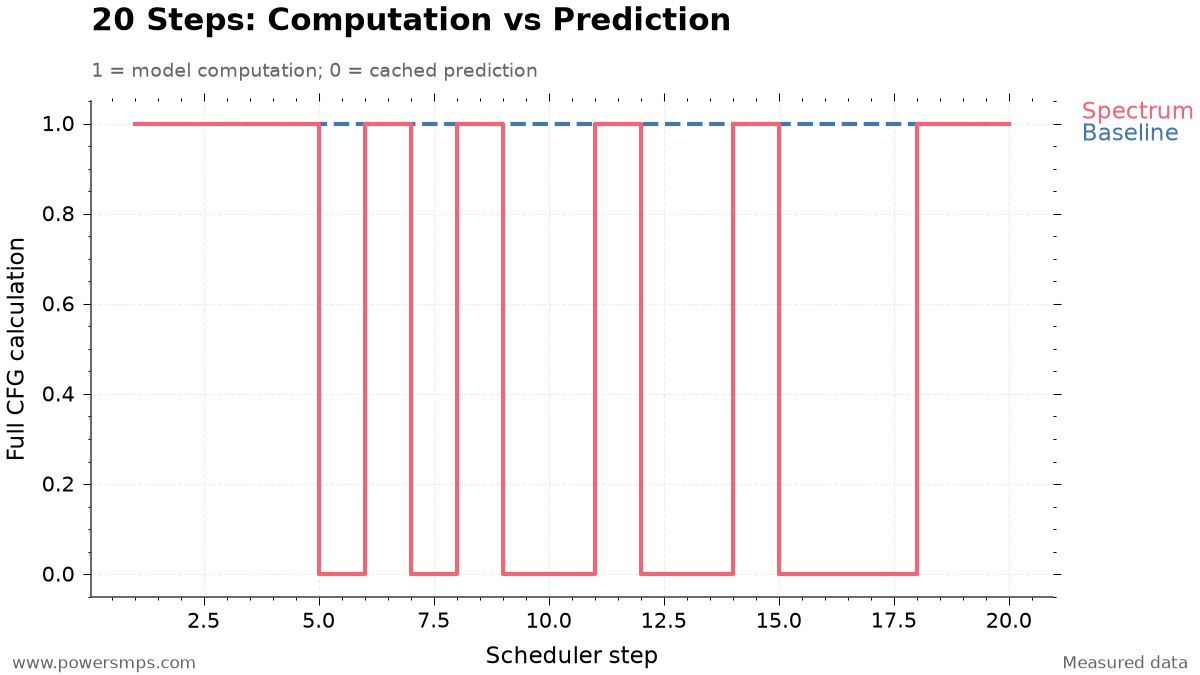
Here, 11 computation steps do not translate to just 11 NPU executions. Each CFG step requires separate DiT evaluations for conditional and unconditional inputs.
Because each transformer evaluation traverses 84 RKNN subgraphs across 28 blocks, 1 CFG evaluation requires 168 subgraph NPU executions (84 × 2). Therefore, the 11 model computations in the Spectrum pipeline represent the following actual hardware traversal volume:
- Full model passes (Transformer Passes): 11 passes × 2 = 22 passes
- Subgraph NPU execution count: 11 passes × 2 × 84 subgraphs = 1,848 executions
By contrast, the baseline pipeline executes 40 transformer passes and 3,360 subgraph NPU executions across 20 steps. In other words, Spectrum eliminated exactly 18 model passes and 1,512 subgraph executions, significantly cutting hardware load.
5. Benchmark Results: Total Generation Time Reduced by 41.02%
The baseline and Spectrum were evaluated on the same ROCK 5C 8GB. The resolution (512×512), 20 steps, CFG scale of 4.0, and seed 20260812 were kept strictly identical.
| Metric | Baseline Non-cached FP16 RKNN + sd-cpp VAE | Spectrum Accelerated Pipeline | Difference & Speedup |
|---|---|---|---|
| 20-Step Denoise Latency | 2,408.54 seconds | 1,356.58 seconds | 1,051.96 seconds saved (43.68% reduction, 1.775× speedup) |
| sd-cpp Tiled CPU VAE Decoding | 155.04 seconds | 155.46 seconds | +0.42 seconds (comparable run-to-run variance) |
| Total Elapsed Time (Excluding Prompt Encoding) | 2,563.58 seconds | 1,512.04 seconds | 1,051.54 seconds saved (41.02% reduction, 1.695× speedup) |
The measured figures highlight the following bottleneck and optimization characteristics:
- Concentration of Denoising Acceleration: Net 20-step denoise latency decreased from the baseline of 2,408.54 seconds to 1,356.58 seconds with Spectrum, saving 1,051.96 seconds. This represents a 43.68% time reduction and a 1.775× speedup. This achieves near-linear acceleration efficiency, closely matching the proportion of skipped operations (45%, or 9 out of 20 steps).
- Independence of VAE Decoding: The lightweight tiled CPU VAE decoder from sd-cpp, powered by ARM NEON/OpenMP via the ggml backend, took 155.04 seconds for the baseline and 155.46 seconds for the Spectrum pipeline—a difference of just 0.42 seconds. In this benchmark, VAE decoding time remained essentially identical, confirming that the performance gains were concentrated almost exclusively in the denoising stage.
- Full-Pipeline Speedup: Excluding prompt encoding, total end-to-end pipeline latency dropped from the baseline of 2,563.58 seconds (approximately 42 minutes 43 seconds) to 1,512.04 seconds (approximately 25 minutes 12 seconds), saving 1,051.54 seconds. The complete generation pipeline achieved a 41.02% reduction and a 1.695× speedup, successfully fulfilling the project target of generating images in under 30 minutes.
6. What Is the Image Quality of the Accelerated Output?
Caching algorithms that perform step prediction carry the risk that accumulated error might cause the latent space to diverge or produce invalid numerical values (NaN, Inf). Therefore, immediately upon pipeline completion, we conducted staged verification covering both numerical integrity of the output tensors and image-level visual quality.
Neither NaN nor Inf occurred in the final latent variables after completing all 20 steps. Numerical stability was confirmed independently of the final image’s visual fidelity.
The generated 512×512 image met the visual quality criteria established for this experiment. Under these tested conditions, we therefore achieved acceptable output while significantly cutting generation time.
This visual assessment is limited to a single validation run (1 run) under specific conditions (512×512 resolution, 20 steps, Guidance Scale 4.0, Seed 20260812). Spectrum’s \(x_0\) prediction is not mathematically lossless, and slight latent-space errors are introduced by the approximation. Consequently, these findings do not imply exact numerical identity with the baseline, nor do they guarantee lossless quality free from visual degradation across arbitrary prompts and seeds.
7. Comparing with the Baseline Using Identical Weights
Spectrum modifies which steps are directly evaluated; it does not requantize or convert model weights.
Because it operates on the identical 84 FP16 RKNN models, disabling prediction caching immediately reverts execution to the full-step baseline.
- Compare outputs with caching enabled versus disabled using the same prompt, seed, and step count.
- Verify both numerical stability and the visual quality of the resulting image.
- If output quality fails to meet expectations under new conditions, disable prediction and compute all steps.
Under the tested conditions, total generation time decreased by 41.02%. When applying this technique to other prompts and seeds, results should always be compared against the baseline. In Part 3, we examine alternative optimizations that reduced execution time but were discarded due to visual quality degradation or memory overhead.
Leave a Reply